EByte Case Study Inspecting and Editing a Real ZIP Archive
A ZIP file is a good test of whether a schema can follow a real format’s bookkeeping. Every file inside it is described twice: once in a local header just before its data, and again in a central directory near the end. A short end record then says where that directory starts. This case study built a one-file ZIP with Python’s zipfile module, read it with the released ebyte 0.1.1 binary, edited it and then fed it archives it wasn’t built for.
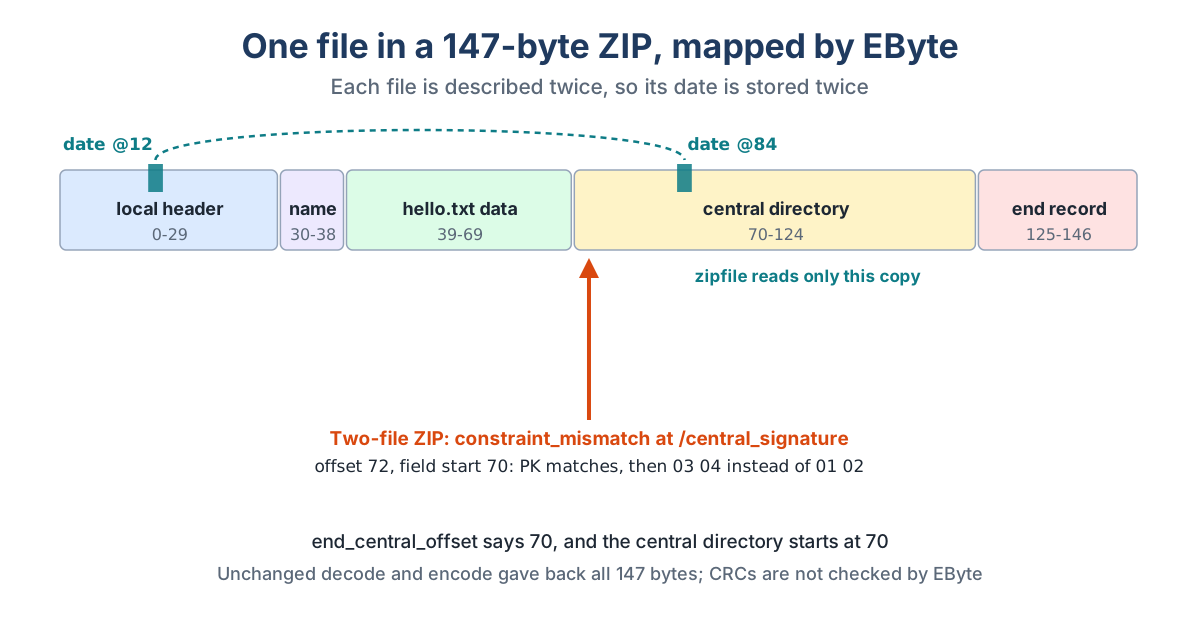
The archive holds hello.txt, 31 bytes of text, stored without compression and dated October 20, 2026, 09:30. The whole ZIP is 147 bytes: a 30-byte local header, the 9-byte name, the 31 bytes of data, a 55-byte central directory entry and a 22-byte end record.
The Schema
The schema runs straight through the file with 43 fields, prefixed local_, central_ and end_ so the trace reads like a map. The name, the extra field, the data and the comment take their lengths from the header fields before them. Checks pin the four-byte signatures, the stored method, a clear flags field and exactly one entry in the end record. Here’s how the local part starts:
{"name": "local_signature", "type": "bytes", "length": 4, "expect": "504b0304"},
{"name": "local_version_needed", "type": "u16"},
{"name": "local_flags", "type": "u16", "expect": "0"},
{"name": "local_method", "type": "u16", "expect": "0"},
{"name": "local_mod_time", "type": "u16"},
{"name": "local_mod_date", "type": "u16"},
{"name": "local_crc32", "type": "u32"},
{"name": "local_compressed_size", "type": "u32"},
{"name": "local_uncompressed_size", "type": "u32"},
{"name": "local_name_length", "type": "u16"},
{"name": "local_extra_length", "type": "u16"},
{"name": "local_name", "type": "string", "encoding": "utf8", "length": {"field": "local_name_length"}},
{"name": "local_extra", "type": "bytes", "length": {"field": "local_extra_length"}},
{"name": "file_data", "type": "bytes", "length": {"field": "local_compressed_size"}}
ebyte inspect put the name at offset 30, the data at 39, the central directory at 70 and the end record’s pointer to it, end_central_offset, at value 70. That’s the archive checking its own arithmetic, and the numbers agreed.
Round Trip and Three Edits
decode wrote a 1,286-byte JSON document with the file name as readable text and the contents as hex. encode on the unchanged document gave back an identical 147-byte archive.
| Edit in the JSON | Bytes changed | What zipfile read |
|---|---|---|
| Both date fields set to 1 January 2025 | 4 | hello.txt dated 2025-01-01 09:30, contents intact, CRC check passed |
Archive comment "built by ebyte", comment length "14" |
1 changed, 14 added | The same file with the new archive comment |
| Only the central directory’s date changed | 2 | Dated 2025-01-01, with the local header still saying 2026 |
ZIP stores dates in the old MS-DOS format, so 1 January 2025 is the number 23073 in both header fields.
That last row is worth a second look. Python’s zipfile reads the central directory, so it reported the new date and raised no objection. The local header beside the data still said October 2026. Tools that read local headers would disagree with tools that don’t. EByte doesn’t stop you from making that edit, since both values are just numbers to it. What it does is show both copies side by side in the trace, at offsets 12 and 84, which makes the mismatch easy to spot.
Archives It Wasn’t Built For
Two files. A ZIP with a second file failed with constraint_mismatch at /central_signature, offset 72, field starting at 70. Bytes 70 and 71 are PK, the same as any ZIP signature. Byte 72 is where the second file’s local header (03 04) differs from the central directory signature the schema expected (01 02). The trace showed everything before it complete and stopped right there. Version 1 can’t repeat a block until a signature changes, so this schema describes one-file archives only.
A comment without its length. Setting the comment text but leaving its length at 0 failed on encode with value_out_of_range at /end_comment. EByte won’t adjust a length field for you, and it won’t write a file where they disagree.
A flipped bit in the data. This one EByte accepted. One bit flipped inside hello.txt’s bytes decoded without complaint, exit 0, because a schema in version 1 has no way to check a CRC. Python’s zipfile.testzip() caught it straight away and named hello.txt. A structural check isn’t an integrity check, and EByte doesn’t pretend to be one.
What It Showed
EByte read and rewrote a real ZIP byte for byte and made small, precise edits to it. It made the format’s duplicated fields visible instead of hiding one behind the other. The limits were just as clear. A single fixed schema handles exactly one entry. Lengths and offsets have to be kept in step by hand. Checksums aren’t verified. For anything beyond inspecting and patching small archives, a real ZIP library is the right tool, and EByte is the thing that shows you what that library will be reading.
The BMP case study edits an image the same way, and the schema reference lists every field option used here.