EByte Launches One Schema for Reading and Writing Binary Files
EByte 0.1 is out. It’s a small Go library and a command-line tool for binary file formats, and it does one thing that sounds obvious until you’ve tried it: you describe a format once, and that single description reads files, writes them and explains them.
Here’s the usual situation it’s meant for. A device exports a file, or an old program saves one, and you need to look inside it, change a value and save it again. You end up writing a reader. Then a writer, which has to agree with the reader to the byte. Then, when a file won’t load, you open a hex editor and count bytes by hand to find out which field went wrong. That’s three descriptions of the same format, and they drift.
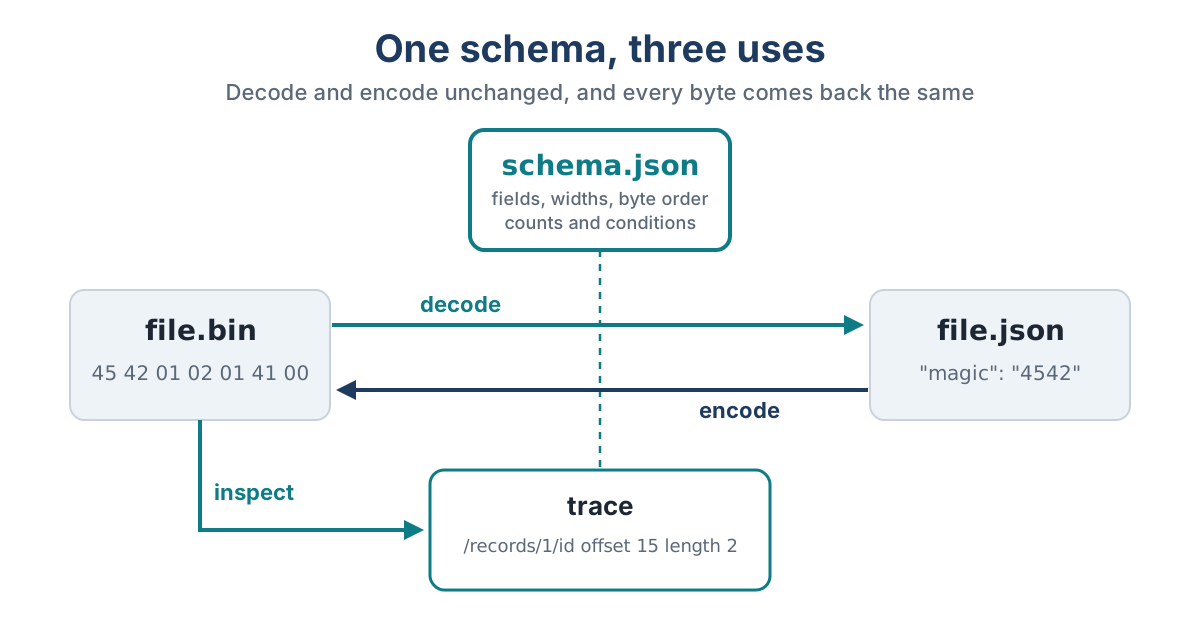
With EByte the description is a JSON schema. ebyte decode turns a file into a JSON document you can edit. ebyte encode turns the document back into bytes. ebyte inspect lists every field with its offset and length, and when a file breaks the schema it points at the exact field and byte.
Byte for Byte
The promise that matters most is the round trip. Decode a file, encode the document without touching it, and every byte comes back, padding and reserved fields and trailing spaces included. EByte gets there by refusing to guess: anything a format stores has to be declared in the schema, so nothing can be dropped quietly along the way.
Edits behave the way you’d hope. Add a record to an array and EByte updates the count that goes with it and moves every later field along. In the example format that ships with EByte, adding one record turns a 21-byte file into a 25-byte one, the count goes from 2 to 3 and the last field moves from offset 19 to 23. Those numbers were written down before the encoder existed, and the encoder had to match them.
Errors That Say Where
When a file doesn’t match, EByte prints one line of JSON with the field, the byte where things went wrong, where that field began, and what it expected:
{"diagnostic_version":1,"stage":"decode","code":"truncated_input","path":"/samples","offset":1000,"field_start":44,"expected":"1600 bytes","observed":"956 bytes"}
That one came from a WAV file cut short at 1,000 bytes. The diagnostic never includes the file’s contents, only lengths and positions, so it’s safe to paste into a bug report.
What’s in 0.1
- Integers from 8 to 64 bits, signed or not, little or big endian
- ASCII and UTF-8 strings, raw byte fields, and lengths that refer to an earlier field
- Arrays, nested ones too, with counts that are stored or worked out by the encoder
- Fixed values such as magic numbers, and fields that are present only when an earlier field has a certain value
- A ceiling on every size, so a hostile file can’t make EByte read or allocate without limit
It doesn’t do floating point, bit fields, offsets or arithmetic between fields yet. Comparing two files field by field through a schema is planned for a later version.
Getting It
Binaries for Linux, macOS and Windows are on the download page, and the quick start walks through a first round trip in a few minutes. Go programs can go get github.com/softdevstudio/ebyte. There’s nothing outside the Go standard library in it.
EByte is free and open source under the Apache License 2.0. The code and the recorded test results are on GitHub.