EByte Case Study Reading and Editing a Real WAV File
The example that ships with EByte is a made-up format. This case study uses a real one: a WAV audio file, made by Python’s standard wave module and read with the released ebyte 0.1.0 binary, downloaded from GitHub like anyone else would get it. Everything below, every number and every error, is what that binary actually printed.
The file is a tenth of a second of a 440 Hz tone, mono, 16-bit, 8,000 samples a second. That makes 1,644 bytes: a 44-byte header and 1,600 bytes of samples. The Linux archive’s checksum matched SHA256SUMS before anything ran.
The Schema
A plain PCM WAV file is a short run of fixed fields, which suits EByte well. The four-letter tags become byte fields with expect, so a file that isn’t a WAV is turned away at the first byte. The sample data is a byte field whose length comes from data_size:
{
  "schema_version": 1,
  "name": "pcm_wav",
  "endian": "little",
  "fields": [
    {"name": "riff", "type": "bytes", "length": 4, "expect": "52494646"},
    {"name": "riff_size", "type": "u32"},
    {"name": "wave", "type": "bytes", "length": 4, "expect": "57415645"},
    {"name": "fmt_id", "type": "bytes", "length": 4, "expect": "666d7420"},
    {"name": "fmt_size", "type": "u32", "expect": "16"},
    {"name": "audio_format", "type": "u16", "expect": "1"},
    {"name": "channels", "type": "u16"},
    {"name": "sample_rate", "type": "u32"},
    {"name": "byte_rate", "type": "u32"},
    {"name": "block_align", "type": "u16"},
    {"name": "bits_per_sample", "type": "u16"},
    {"name": "data_id", "type": "bytes", "length": 4, "expect": "64617461"},
    {"name": "data_size", "type": "u32"},
    {"name": "samples", "type": "bytes", "length": {"field": "data_size"}}
  ]
}
ebyte validate-schema accepted it and printed its identity, a SHA-256 starting d8a6585e.
Looking Inside
ebyte inspect --format text listed all 15 entries, the whole file plus 14 fields. The ones that matter here:
"/riff_size" u32 offset=4 length=4 state=complete value=1636
"/channels" u16 offset=22 length=2 state=complete value=1
"/sample_rate" u32 offset=24 length=4 state=complete value=8000
"/byte_rate" u32 offset=28 length=4 state=complete value=16000
"/data_size" u32 offset=40 length=4 state=complete value=1600
"/samples" bytes offset=44 length=1600 state=complete
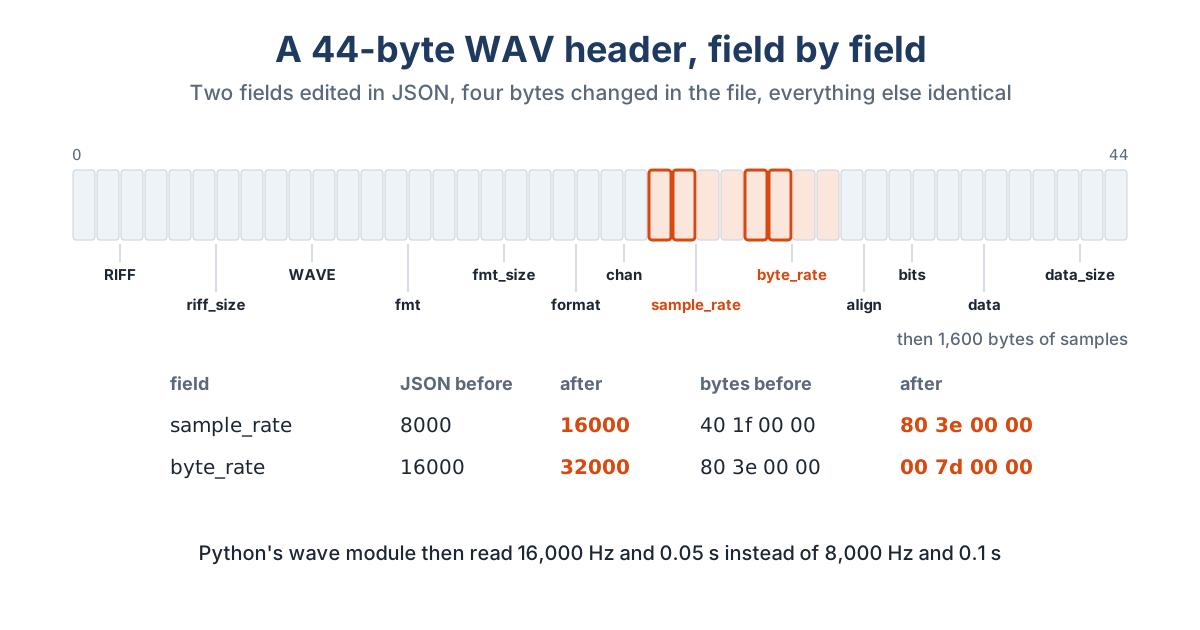
That’s the header any WAV reader would agree with: 1,636 bytes after the first eight, one channel, 8,000 samples a second, 16,000 bytes a second, 1,600 bytes of audio starting at offset 44.
The Round Trip
decode wrote a 3,576-byte JSON document, roughly twice the file, mostly the samples as hex. encode turned the unchanged document back into a WAV. Both files had the same SHA-256, 8f70a2ee..., and cmp found no difference.
An Edit
Doubling the sample rate plays the same samples twice as fast. In the JSON that meant changing sample_rate from "8000" to "16000" and byte_rate from "16000" to "32000", then encoding to a new file. Comparing the two WAVs byte by byte found exactly four differences, at offsets 24, 25, 28 and 29: the low bytes of the two numbers that changed. Python’s wave module read the new file as 16,000 Hz with the same 800 frames, so 0.05 seconds instead of 0.1.
Running the same encode a second time, to the same output name, stopped with destination_exists and exit code 1. The first output was left as it was.
When Things Go Wrong
This is the part EByte was built for, so the case study broke the file in five ways.
| What was done | What EByte said | Exit |
|---|---|---|
| File cut short at 1,000 bytes | truncated_input at /samples, offset 1000, field started at 44, expected 1600 bytes, saw 956 |
2 |
| The JSON document passed in as if it were the WAV | constraint_mismatch at /riff, offset 0 |
2 |
| Four extra bytes added at the end | trailing_data at offset 1644 |
2 |
channels set to 70000 in the JSON |
value_out_of_range at /channels |
2 |
Half the samples deleted, data_size left alone |
value_out_of_range at /samples |
2 |
Every diagnostic was one line of JSON on standard error. None included any of the file’s bytes.
On the cut-short file, inspect still printed the trace up to the break, with /data_size complete and /samples marked failed at 956 bytes, then exited with code 2. That’s the view you’d otherwise build by hand in a hex editor.
What It Showed
EByte handled a real PCM WAV file the way it handles its own example: an exact round trip, an edit that touched only the bytes it had to, and errors that named the field and the offset each time.
It also showed the edges of version 1. byte_rate is sample rate times block size, and riff_size is the file size minus eight, but EByte has no arithmetic between fields, so those had to be updated by hand, and changing the amount of audio means editing data_size and riff_size yourself. EByte catches the mistake when the length and the data disagree. It won’t fix it for you. Many WAV files in the wild also carry extra chunks, such as a LIST chunk with metadata, in an order that varies, and a fixed list of fields can’t describe that. This schema covers the plain 44-byte header and nothing else.
On the test machine, decoding the file took about 4 milliseconds from start to finish, in a single run. The schema and the commands are short enough to repeat in a few minutes from the quick start. Two more formats get the same treatment in the BMP case study and the ZIP case study, and checking a folder of recordings puts this WAV schema to work in a script.