EByte Case Study Editing a WAV Title in the Browser
EByte 0.7.0 runs in a web browser. The release has a new asset, ebyte-wasm.zip, which is the same Go library compiled to WebAssembly, and the demo page on this site loads it. There’s no server behind the page: a file you open is read by the page itself and never sent anywhere. This case study used the demo the way someone new to EByte would, with a file of their own, and then checked what came out with tools that know nothing about EByte.
The page ran in Chromium, driven by Playwright so every step could be repeated and timed. Before anything else it asked the loaded build to describe itself: Go 1.27.3, commit ccb00da, no local changes, which is the commit the 0.7.0 release was built from. The file was a three-second tone written by ffmpeg with a title and an artist, 132,412 bytes. The schema was “WAV, every chunk” from the schema library, which reads any WAV as a list of chunks with derived sizes.
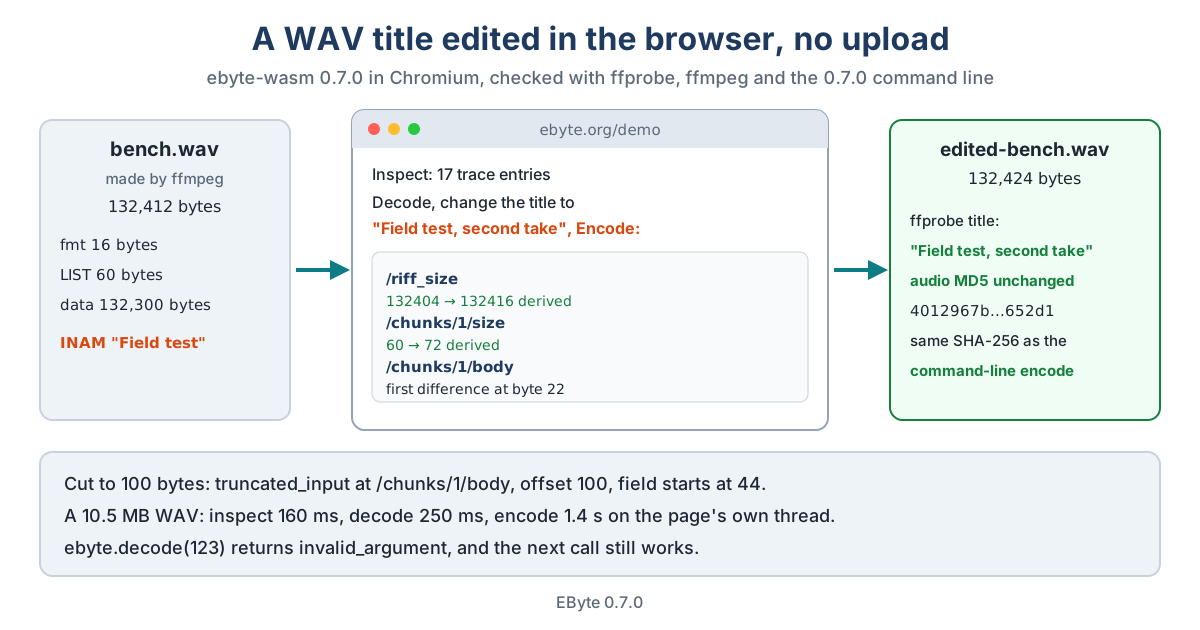
Inspect and Decode
Inspect listed 17 fields. ffmpeg had written three chunks: fmt (16 bytes), LIST (60 bytes, holding the metadata) and data (132,300 bytes of samples). The LIST chunk starts at offset 36, and its body runs from offset 44 for 60 bytes; clicking a row shows its bytes in the hex view below the table.
Decode turned the file into JSON in a text box. The LIST body is one hex string, because the schema treats it as opaque bytes, so the title edit was done the plain way: the INAM entry inside it was rewritten from “Field test” to “Field test, second take”, which is 12 bytes longer, with its own small length updated to match.
Encode and Check
Encode said the result differs from the input and listed three changes. /riff_size went from 132404 to 132416 and /chunks/1/size from 60 to 72, both marked derived: the encoder worked them out from the new body. /chunks/1/body changed from byte 22, where the title starts. The download link gave edited-bench.wav, 132,424 bytes.
Then the checks, outside the browser:
- ffprobe read the title as “Field test, second take”, with the artist and the encoder tag unchanged.
- ffmpeg’s MD5 of the decoded audio was
4012967b44c0a65ac86cc230b45652d1for both files, and Python’swavemodule counted the same 66,150 frames at 22,050 Hz. - The same edited JSON, encoded by the downloaded 0.7.0 Linux command line, gave a file with exactly the same SHA-256 as the browser’s.
That last point is the one that matters for the browser build. It isn’t a lookalike of EByte written for the web; it’s the same interpreter, and it writes the same bytes.
When Things Go Wrong
The file was cut to its first 100 bytes and opened again. Inspect turned the last rows red and said truncated_input at /chunks/1/body, offset 100, in a field that starts at 44: it expected 60 bytes and found 56. The command line reports the same four numbers for the same file.
A call the page can’t use is reported too. Asked to decode the number 123 instead of a schema and a file, the build returned invalid_argument rather than crashing, and the next call worked normally. Before this was fixed during review, one bad call from a page stopped the whole WebAssembly runtime until a reload.
How Fast
A longer recording, 110 seconds at 48 kHz and 10.5 MB, went through the build’s own calls on the same page. Inspect took 160 ms, decode 250 ms and encode 1.4 seconds, and the re-encoded bytes were identical to the original. The command line on the same machine took 68 ms to inspect, 139 ms to decode and 558 ms to encode. Most of the encode time in both is reading a 21-million-character JSON document of hex. The calls run on the page’s own thread, so the page doesn’t respond while one is working. For files up to a few hundred kilobytes that’s not noticeable; at 10 MB it’s a second or so.
The first visit downloads a 5.7 MB WebAssembly file, about 1.5 MB compressed. The download page has ebyte-wasm.zip for anyone who wants to put it in a page of their own, and the notes show how to load it.