EByte Case Study Importing Kaitai Struct Formats and Editing ZIP Archives
Kaitai Struct has a public gallery of 191 format descriptions, written in YAML as .ksy files. EByte 0.8.0 adds ebyte import-ksy, which turns one of those files into an EByte schema, so the same format can be decoded to editable JSON and written back byte for byte. It also derives the offset that each ZIP central directory entry keeps for its file, which was the last number a ZIP edit needed by hand. This case study ran both with the released ebyte 0.8.0 Linux binary, downloaded from GitHub, after its archive matched SHA256SUMS.
The honest number first. Run over the whole gallery (kaitai_struct_formats at commit 7d17566), the importer accepted 9 of the 191 files: STL, an MBR partition table, glibc and AIX utmp logs, the Duck IVF video container, the Shapefile index, Windows SYSTEMTIME, the Android nanoapp header and the MONOMAKH-SAPR CHG container. Every other file uses something an EByte schema has no way to say. The common ones are reads at a computed position (76 files), a type chosen at run time with switch-on (55) and sizes or counts given as expressions, such as width * height (47). For those the importer prints every reason and writes nothing, rather than a schema that reads the file differently.
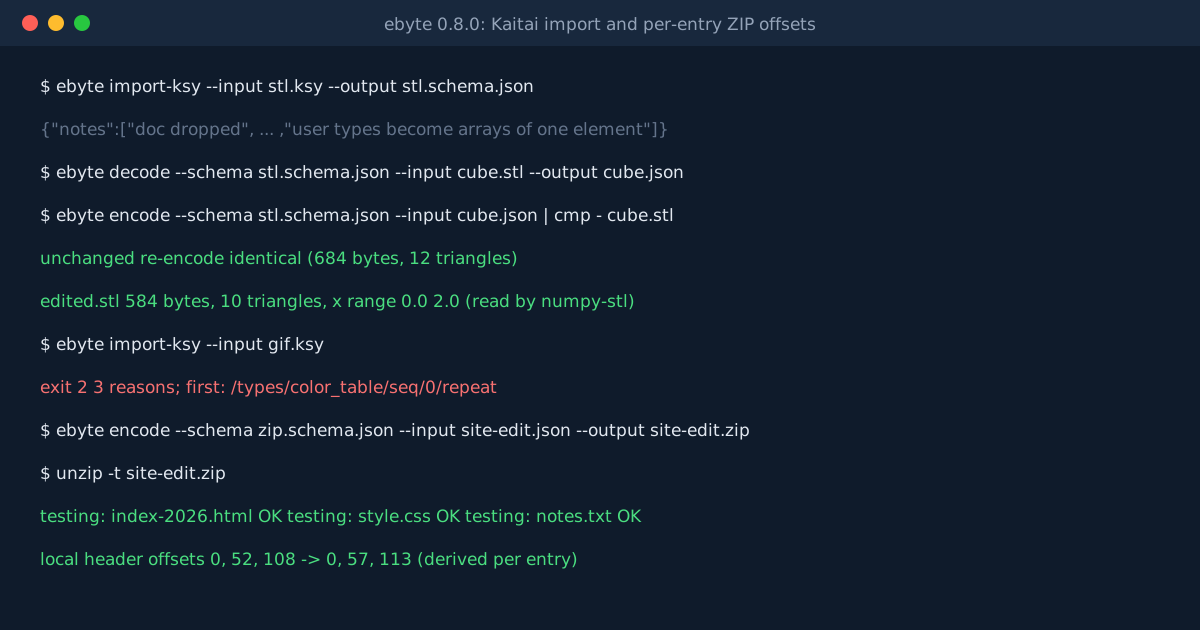
Importing STL
ebyte import-ksy --input stl.ksy --output stl.schema.json
The command exited 0 and printed what it left out on standard error: the documentation text, the meta fields other than the id and byte order, and a note that user types become arrays of one element. EByte has no plain struct type, so Kaitai’s normal: vec3d becomes "normal": [{"x": ..., "y": ..., "z": ...}] in the document. The triangle count is a driving count_of, so it isn’t in the document at all. Delete a triangle and the count follows.
The test file was a unit cube saved by the Python library numpy-stl: 12 triangles, 684 bytes, volume 1.0. ebyte decode gave a document with 12 triangles. ebyte encode on that document, unchanged, gave back the same 684 bytes. A small script then doubled every vertex’s x coordinate and dropped the last two triangles. The re-encoded file was 584 bytes, and numpy-stl read it as 10 triangles with x running from 0 to 2.
Before the release, the nine gallery formats were checked against Kaitai itself: a sample of each was built byte by byte, read by the official Kaitai compiler and JavaScript runtime 0.11.0, and decoded by EByte. Every stored value matched, in order, and every sample encoded back to identical bytes.
What a Refusal Looks Like
ebyte import-ksy --input gif.ksy
This one exits 2 with nothing on standard output. Standard error holds one JSON object listing three reasons with their paths in the file. The first is /types/color_table/seq/0/repeat: the GIF colour table repeats to the end of its own sized block, and EByte can only repeat to the end of the whole file. The gallery’s ZIP and WAV descriptions both stop at /meta/imports, because they pull in shared types from other files. EByte already has its own ZIP and WAV schemas.
Editing a ZIP With Three Files
The second half used the library’s zip.schema.json on an archive made with Python’s zipfile: index.html and notes.txt stored, style.css deflated. Its local headers started at offsets 0, 52 and 108. The edit renamed index.html to index-2026.html, in both the local header and the central directory, and replaced the text of notes.txt with a longer line. Because this file is stored uncompressed, its CRC-32 and size are plain numbers in the document, so the script set those too.
Until 0.8.0 that edit also meant working out every later local header offset by hand. Now each central directory entry declares {"offset_of": {"element_of": "entries"}}, which means “where entry number k starts”, and the encoder writes them. The new archive had its headers at 0, 57 and 113, five bytes later each. unzip -t reported no errors, and zipfile read the new text back.
What This Proves and What It Doesn’t
The importer works for formats laid out in a fixed order, with sizes and counts taken from earlier fields. That’s a small part of the gallery, and the Kaitai import reference lists the mapping, the refusal counts and the remaining differences. Kaitai ignores bytes after the last field and EByte refuses them. A UTF-8 string with a broken byte reads in Kaitai with a replacement character and fails in EByte. The ZIP schema still leaves each CRC-32 and uncompressed size to you, because for a deflated file they describe data EByte doesn’t decompress. One cube and one small archive are a working example, not a survey of real-world files.